

Template test data
Use ‘test data’ on a template to mock the payload your app will pass in when triggering an email. With test data in place, you can reference variables and preview how the template renders with real-world data.
Adding test data to a template
Section titled “Adding test data to a template”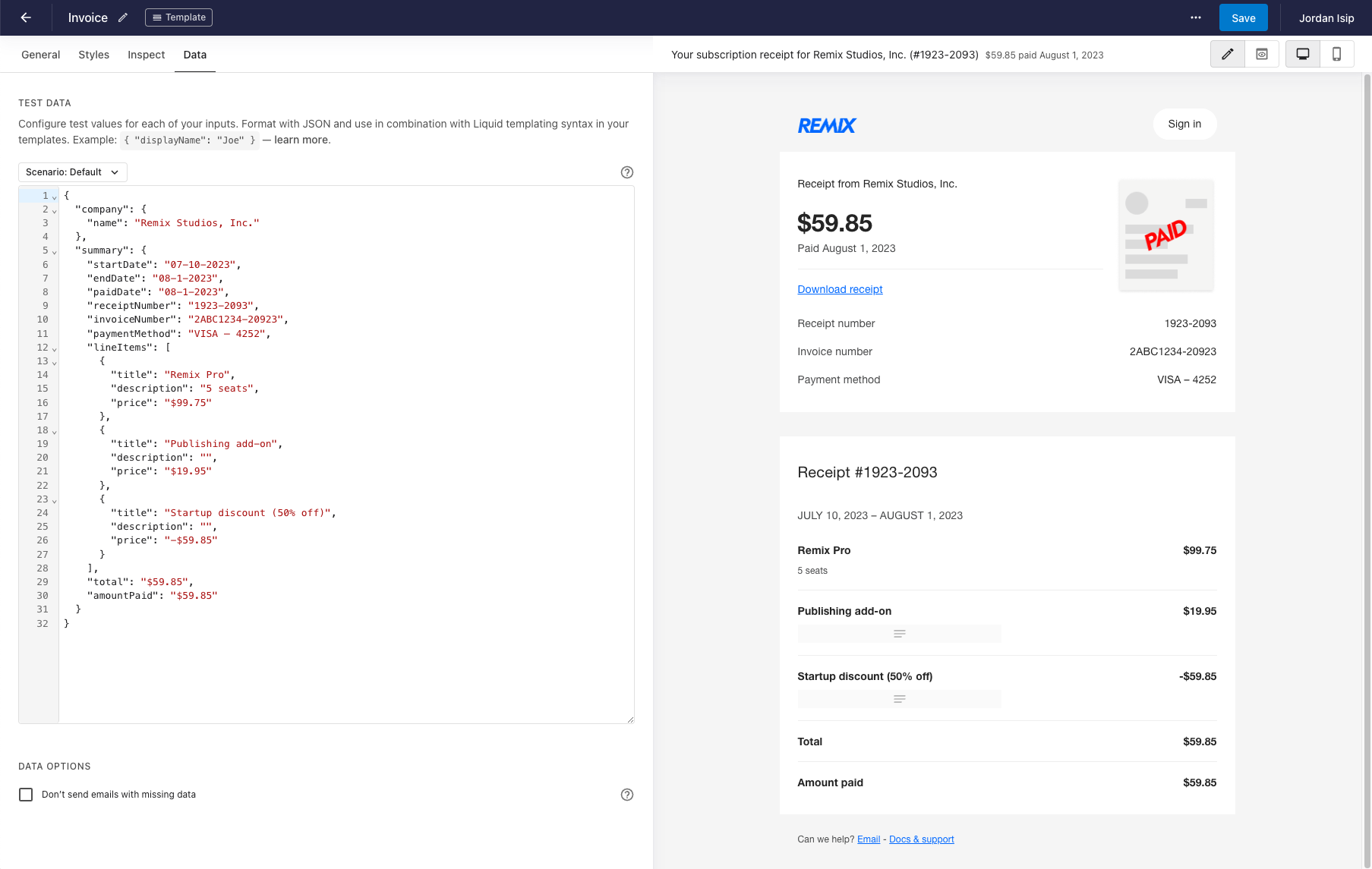
Add test data from the ‘Data’ tab in the template builder. Data is a JSON object, referenced from your template and blocks using LiquidJS templating.
Test data scenarios
Section titled “Test data scenarios”Data-rich templates like reports or receipts often have conditional logic that shows or hides content based on what’s passed in. That’s hard to design around when the template can receive very different sets of data.
To help, Waypoint lets you model multiple test data scenarios and switch between them. Combined with the visual template builder, you can quickly see how the template looks in each one.
Creating a test data scenario
Section titled “Creating a test data scenario”From the ‘Data’ tab in the template builder, open the scenario dropdown and click ’+ Add scenario’.

Adding a scenario duplicates your default data, so you can manage and toggle between separate sets.